
How Can Businesses Use Video Content to Attract Customers and Increase Sales?
Video has become an important part of digital marketing because it helps businesses grab attention, explain their products or services, and build trust with potential customers. Sometimes, a written description or product image isn’t enough to convince someone to make a purchase. Videos make it easier for people to see how a product works, understand its features, or get a better idea of the service they can expect. They also give businesses a chance to show their work, answer common customer questions, and explain the value of their offerings in a more engaging way. The numbers also show why businesses are giving more importance to video marketing. According to Wyzowl’s 2026 survey, 91% of businesses use video as a marketing tool, while 85% of consumers say they have been convinced to buy a product or service after watching a video.This shows that videos can play an important role in helping customers make buying decisions
Why Video Content Works for Attracting Customers and Driving Sales
Video works best when it answers one specific question your customer already has. Before you shoot anything, ask what’s stopping them from buying. “Will this fit me?” needs a size or try-on demo. “Is this hard to use?” needs a two-minute walkthrough. “Can I trust this brand?” needs a real customer on camera. Wyzowl’s data backs this up: 96% of people say an explainer video helped them understand a product, and 85% were convinced to buy after watching one.
Choosing the right product demo is simple. Pick the feature people ask about most, show it being used in real conditions, and stick to one problem per video. Skip the long brand story and show the result. Keep the quality decent too, since 89% of consumers say video quality affects how much they trust a brand.
Then tell viewers what to do next. End with one clear action, like “Book a free demo”, “WhatsApp us for pricing” or “Tap the link to order”. Without a next step, a video just gets watched and forgotten.
Lemonlight’s team suggests sharing proof, education and support content at the nurture stage. A behind-the-scenes tour or a casual team Q&A does that job well, because viewers see real people and real results.
How Video Builds Trust
Videos can be more convincing than claims on a page. Show our audience the actual product or the team working behind the scenes. We can show a demo of the features or introduce employees or founders on camera and share customer stories. Avoid over-polished clips that promise too much people notice. You can show transparency on camera by answering the common questions instead of making broad and false claims which also builds our credibility. A walkthrough of how your software works or a step-by-step tutorial can reassure someone considering a purchase.
What Video Converts (Landing Page Insights)
Placing a video on a landing page can explain the offer quickly, but it’s not a guaranteed conversion booster. Industry analysis found that simply adding video didn’t always raise conversion rates on its own. Use landing page videos instead where they truly add value for our audience. If a demo or testimonial is resolving a common problem faced by the people, include it near the CTA. Always test 2 versions, one with and without audio and see what actually is working for your audience.
Visibility in Both Search and Social Media
With Reels, one can put the brand in front of new audiences; YouTube tutorials are for fielding the questions people are looking up. Be sure to have titles and descriptions that are unambiguous to be understood by both your viewers and search engines. Captions should be put on videos to allow them to be followed with no sound.
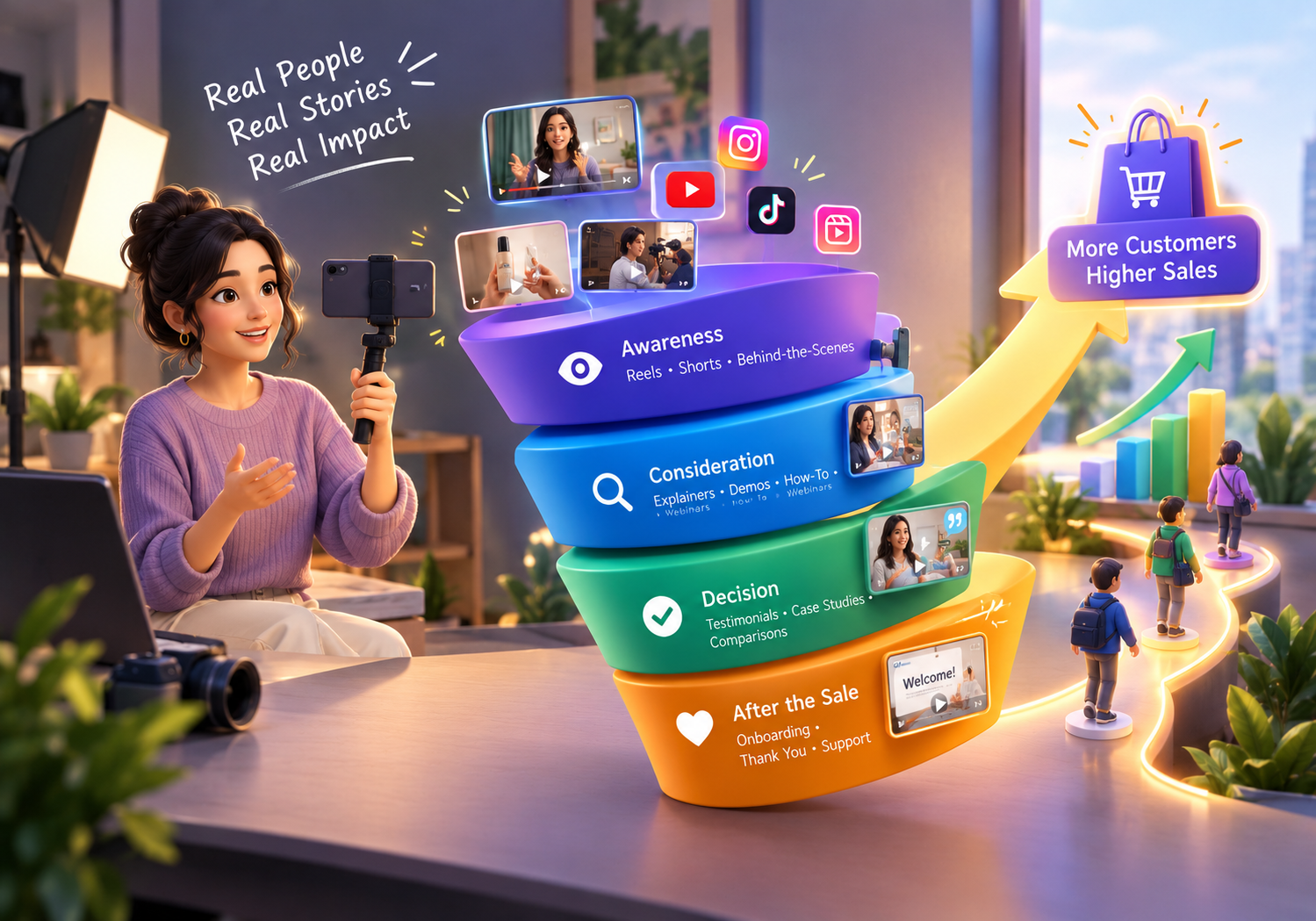
Which Type of Video Works at Each Stage of the Buyer’s Journey
Awareness: Short Reels, Shorts and Behind-the-Scenes Videos
Short Reels, Shorts and Behind-the-Scenes Videos
Shorts, Reels, founder videos and behind-the-scenes clips help introduce the brand. Focus on one interesting idea or a common customer problem to encourage people to learn more.
Consideration: Explainers, Product Demos, How-To Videos and Webinars
Explainers, Product Demos, How-To Videos and Webinars
Showcase your offers through walkthroughs, tutorials and webinars. These formats help potential customers understand how your product or service works before they decide whether it suits their needs.
Decision: Testimonials, Case Studies and Comparison Videos
Testimonials, Case Studies and Comparison Videos
Testimonials, case studies and comparison videos can address final concerns. Explain what makes your offer suitable for the customer and answer common objections before they make a decision.
After the Sale: Onboarding and Thank-You Videos
Onboarding and Thank-You Videos
Send onboarding and thank-you videos to help customers use their purchases and encourage repeat business. A short tutorial can explain the next steps and make the customer experience easier.
8 Practical Ways Businesses Can Use Video to Get More Customers
- Product demo videos: Show how your product works and highlight useful features.Customer testimonial videos: Let real customers explain their experience in their own words.
- Customer testimonial videos: Let real customers explain their experience in their own words.
- Short-form videos: Share quick tips and product highlights. HubSpot’s marketing research identifies short-form video as a strong format for ROI.
- How-to and educational videos: Answer common questions through practical tutorials that people can discover on YouTube.Videos on landing pages and product pages: For landing and product pages, put in videos that will let a visitor get the measure of an offer prior to making a purchase.
- Videos on landing pages and product pages: For landing and product pages, put in videos that will let a visitor get the measure of an offer prior to making a purchase
- Videos in email campaigns and WhatsApp follow-ups: Send email marketing campaigns and WhatsApp follow-ups; give interested customers some relevant information about the product and/or a walkthrough.
- Live videos and Q&A: With live video and Q&A sessions, you can have your team field questions as they come and allow for some interaction.
- Video ads for retargeting: Display appropriate video ads to pre-existing website users as permitted by consent and platform policies.
Where to Post Your Videos: Platform Guide
YouTube
YouTube suits tutorials, product reviews and detailed demonstrations. Wyzowl’s 2026 report says 82% of surveyed video marketers use YouTube to host marketing videos.
Instagram Reels and Facebook
Utilize short clips, product highlights and behind the scenes footage. Do not upload the same edit to all platforms; adapt to each platform.
B2B companies can provide tips, tricks, and even video tutorials on how their services can help solve business issues, as well as include client case studies.
Your Own Website
Embed relevant videos on product/service and landing pages. Ensure proper loading and they provide the information that the visitor is seeking.
How Long Should Your Marketing Video Be?
Wyzowl’s 2026 survey found that 71% of video marketers considered videos between 30 seconds and two minutes most effective. Use this as a starting point rather than a strict rule.
- Awareness: 15–45 seconds for a quick introduction.
- Consideration: One to three minutes for demos and explainers.
- Decision: One to five minutes for testimonials and case studies.
- After purchase: Keep onboarding videos short while covering the necessary steps.
How to Build a Simple Video Strategy (Step by Step)
| Step | Action | What You Need to Do | Example |
| 1. Set a Goal | Decide what you want to achieve through the video campaign. | Choose whether your main goal is brand awareness, generating enquiries, or increasing sales. | Generate enquiries for a digital marketing service. |
| 2. Select a Customer Question | Identify what your target audience wants to know. | List common questions customers ask before making a purchase or choosing a service. | “How can SEO help my business get more customers?” |
| 3. Choose a Video Format | Select a format that explains the topic effectively. | Decide whether to create a Reel, product demonstration, tutorial, testimonial, or explainer video. | Create a short educational Reel explaining the benefits of SEO. |
| 4. Write the Hook and Script | Plan what the video will communicate. | Start with an attention-grabbing hook, explain one main idea in simple language, and finish with a clear CTA. | Hook: “Not getting enough website traffic? Here’s why SEO matters.” CTA: “DM us for an SEO consultation.” |
| 5. Plan Distribution | Decide where and how to share the video. | Publish it on relevant platforms, share it through Stories, and create shorter versions where suitable. | Share the Reel on Instagram, Facebook, and YouTube Shorts. |
| 6. Publish and Repurpose | Make the video available to your target audience. | Use relevant captions, keywords, hashtags, and links. Adapt the video into shorter clips or other content formats where appropriate. | Turn one educational video into a short Reel and a carousel post. |
| 7. Measure Results | Check whether the video campaign achieved its goal. | Track views, engagement, link clicks, enquiries, and purchases to understand what worked. | Review how many people clicked the link or sent a DM after watching the video. |
How to Create Business Videos on a Small Budget
Creating a business video on a small budget is easy.
A cell phone, sun and good sound quality are often enough. Outline your talk before you start recording, and edit your footage with free editing software and add captions.
One Shoot for a Month’s Content
Record one longer demonstration or interview. Convert it to short clips, social posts and answers to frequently asked questions. This will save time and provide several pieces of content from the same session.
When to Use AI Tools and When to Use a Real Camera
AI can assist in scriptwriting, caption creation, and editing. When customers want to see your actual product, team or location, use real footage. Do NOT use fake customers (AI-generated).
How to Measure Whether Video Is Increasing Your Sales
| Metric Qualified Enquiries | What to Track | Why It Matters |
| Website Visits | Track how many people visit your website after watching your videos. Use UTM parameters in campaign links to identify which videos are driving traffic. | Helps you understand which videos are bringing visitors to your website. |
| Click-Through Rate (CTR) | Measure how many viewers click on the link or CTA included in your video. | Shows whether your video content and offer are encouraging people to take action. |
| Qualified Enquiries | Count enquiries from people who are genuinely interested in your products or services, such as pricing requests, quotation requests, or service enquiries. | Helps you understand whether your videos are attracting potential customers rather than just views. |
| Landing Page Conversions | Track how many visitors complete an action, such as filling out a form, booking a consultation, or requesting a callback. | Shows whether your video traffic is turning into actual leads. |
| Sales and Purchases | Measure how many customers make a purchase after interacting with your video campaign. | Helps identify which videos are contributing to business revenue. |
| Cost Per Lead (CPL) | Divide your video advertising spend by the number of leads generated. | Helps you understand how much you’re spending to generate each lead. |
| Cost Per Acquisition (CPA) | Divide your campaign spend by the number of customers acquired. | Helps you measure how much it costs to turn potential customers into paying customers. |
Common Mistakes Businesses Make with Video Marketing
- Creating videos without a clear purpose: Match every video to a customer need or funnel stage.
- Leaving out the call to action: Tell viewers what to do next.
- Using the same video everywhere: Adapt content to each platform.
- Only tracking views: Measure enquiries and sales as well as engagement.
Conclusion
Video marketing helps businesses explain their offers, answer customer questions and build confidence before a purchase. Start with one useful video, publish it where your audience spends time and track what happens next.
For help planning a video strategy that supports your wider marketing goals, explore The Bombay Digital Company and its digital marketing services.
FAQs
Does video marketing increase sales?
Video can be used to help with sales, provide product information, and help to establish trust. Results vary by offer and viewer. Monitor enquiries and purchases to see if your videos are aiding customers in the decision-making process.
Which type of video converts best?
Product demonstrations, testimonials and case studies can help customers who are close to buying. Choose the format based on the questions your audience needs answered.
Is video marketing worth it for small businesses?
Yes. Smartphone videos are a great option for small businesses to begin with, as they can showcase products or answer frequently asked questions. Test the outcomes before buying more devices.
How often should I post?
Select a schedule that you can stick to and do well. Begin with a handful of videos and increase or decrease the amount based on audience engagement and the resulting business outcomes.
Can I make videos with just a phone?
Yes. Good lighting, clear audio and a steady camera. You don’t need a lot of fancy equipment to make some useful videos with a simple script and some basic editing.

Leave a Reply